Welcome to the Start of Term resource page! Designed for both new and returning Trinity instructors, this page provides the essential resources you need to get your Moodle courses fully prepared. To kick things off, take a moment to watch our Moodle Dashboard Tour video, which provides a guided walk-through of the main layout and shows you exactly where to locate your assigned courses for the term. From there, you can explore step-by-step video tutorials, pre-launch checklists, quick guides, and practical tools designed to help you organize your course shell, welcome your students, and start the semester with complete confidence.
Finding & Accessing Your Courses
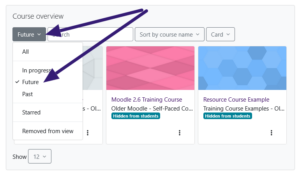
To locate your assigned courses, head to your Moodle dashboard and use the Course Overview block. From the filter dropdown menu, select either All or Future to view your upcoming course shells before the term begins. Once the semester officially starts, these courses will automatically transition and appear under the In-progress filter tab. You can also quickly find any course by using the search bar; for example, typing a specific course code like ASTR 100/1 into the search box will instantly display the matching course.
Course Preparation
Proper course setup is essential for a successful semester. Use the resources in this section to configure your gradebook, set up attendance, integrate Zoom, upload course materials, and prepare your course for students. Faculty are required to record attendance for each class meeting using the Moodle Attendance activity. Attendance should be taken during the scheduled class meeting and should not be recorded in advance. To ensure students have an accurate understanding of their progress, all assignments should be submitted and graded in Moodle, and your gradebook should be kept up to date throughout the semester. Taking the time to properly configure these tools before the semester begins will help create a smooth learning experience for both you and your students.
- Gradebook Setup
- Importing content from a previous semester
- Upload your syllabus
- Attendance Setup
- Zoom Setup
- Create your learning activities. Review How to create an Assignment for a step-by-step tutorial.
- Switch to Student View to confirm only intended content is visible.
- Make your course visible to students
- Send a welcome announcement to your students
Ensure a smooth start with our Start of Term Course Readiness Checklist, a quick guide covering essential setup tasks like due dates, gradebook, and course visibility.
Important Dates to Remember
- August 13 – Adjunct Faculty Orientation
- August 18 – Term 1 Begins
- August 20 – Academic Assembly
- August 21 – Monthly Courses Begin
- August 22 – Alt Week Courses Begin
- October 13 – Term 1 Grades Due (Visit How do I submit Mid-term/ Final Grades)
- October 13 – Term 2 Courses begin
- December 8 Senior Grades Due*
- December 15 Final Grades due*
*Please note: Once final grades have been submitted through Moodle, they cannot be changed. If a grade change is required after submission, the instructor must complete and submit a Change of Grade form in accordance with University policy.